
Create your WODs in 5 minutes, not 30
Crossbook’s WOD Builder creates your workouts for you. Phases, formats, exercises with demonstration videos, a timer for your members, weights calculated based on their personal bests, scoring options, and member posting—it’s all built in. You coach; we take care of the rest.
How much time do you really spend programming your WOD?
If you’re like most French-speaking coaches I come across, your process looks like this:
- You open Excel or a shared Google Doc.
- You copy and paste the week’s program, modifying it by hand.
- You retype the names of exercises, sometimes hesitating over the spelling of a movement.
- You make one capture for the Insta story, another for your Telegram group, a third for the whiteboard.
- You rewrite in simpler terms for beginner coaches who don’t know half the moves.
- And the next day, you do it all over again.
Multiply that by 7 days, by 3 or 4 sessions a day, and you’ll understand why you no longer have a minute for your members.
The WOD Builder gives you that time back.
5 steps, your WOD is ready and validated
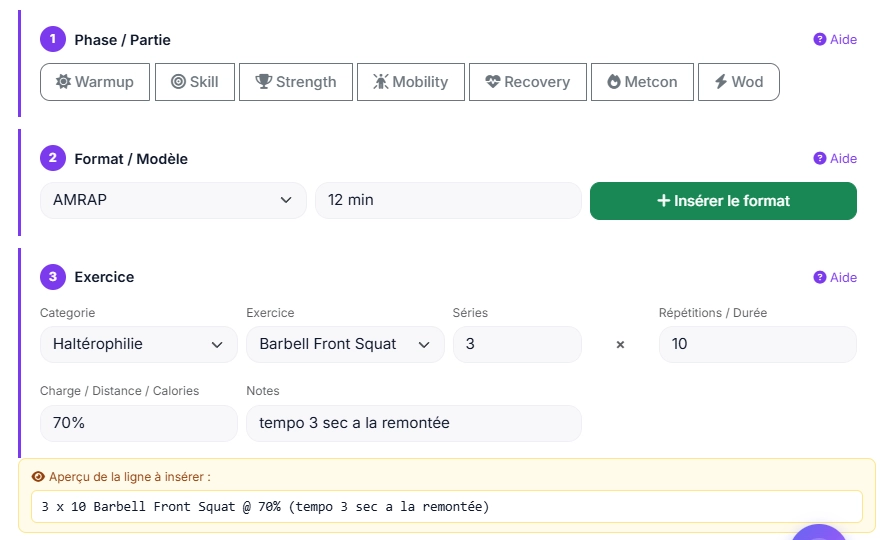
Step 1 – Choose Warmup, Skill, Strength, Mobility, Recovery, Metcon, Main WOD. One click and the formatted title is inserted into your description.
Step 2 — Select the format: AMRAP, EMOM, For Time, RFT, Chipper, Ladder, Tabata, or Interval. The WOD Builder writes the instructions for you—no more messy syntax. You enter the duration, time cap, or number of rounds just once, and they’re used for both the text and your members’ timers.
Step 3 — Add your exercises: Over 400 categorized movements (gymnastics, weightlifting, cardio, etc.), with demonstration videos automatically embedded for members who are new to a movement. Sets, reps, and weight: the same for everyone, or as a percentage of each member’s personal best.
Step 4 – Schedule and publish today’s WOD for your entire box, group session for your competitors, or individual program for a specific member. You choose the date and time of publication.
Step 5 — Sacha analyzes your WOD. Click “Analyze this WOD”: Sacha provides feedback on muscle balance, stimulus, volume, and intensity, and suggests a way to improve or scale the workout. You can post it with confidence.
Everything you need, integrated
Exercise Library: Over 200 exercises categorized by gymnastics, weightlifting, cardio, and accessories. Includes demonstration videos for beginner athletes.
Integrated format templates AMRAP, EMOM, For Time, RFT, Chipper, Ladder, Tabata, Interval. The formatting and intro sentence write themselves. You replace the variables (duration, number of rounds, reps).
When you insert an exercise with a video link, Crossbook automatically adds a “Videos / Exercise demos ” block at the end of the WOD for members. Ideal for newcomers or complex movements.
WOD of the day, group or individual Three programming modes in the same tool. Program everyone at once, or customize for competitors, masters, mums-to-be, injured people in rehab.
Configurable score type: Reps, rounds, time, weight, points—or no score if the session doesn’t require one. Daily scores are automatically categorized (RX+, RX, INT, Scaled).
Timer on the member’s phone: As soon as you select a format, your member will see a “Start Timer” button below the WOD—a full-screen timer already set up for your workout (AMRAP, EMOM, Tabata, intervals, For Time), featuring a countdown at the start, laps, work/rest intervals, and audio cues. At the end of a For Time workout, they can record their time as their score with a single click. No installation required.
Loads calculated for each member. You enter “70%” of the back squat: each member sees their weight in kilograms, calculated based on their personal best and rounded to the nearest 0.5 kg. Don’t have a personal best for this exercise yet? A link prompts them to record it.
Coach description + separate member description You note the stimulus, scaling and coaching cues on the coach side (private). You write a streamlined version on the member side (published in the app). You control what everyone sees.
Smart copy-and-paste Export your WOD with preserved formatting to Instagram, your Telegram group, your whiteboard – without having to retouch anything. Copy all” button at the top of the description.
Delayed publication You can prepare your entire week on Sunday evening. Each WOD has its own publication date for members. No need to think about it at 6am.
Copy a Past WOD With just one click, you can bring back an old WOD and customize it, instead of retyping everything. Whether it’s the WOD of the day, a group WOD, or an individual WOD, you can send it to another group, another member, or add it to the general schedule.
Benchmark Library: The “Girls,” “Heroes,” and Games WODs (Fran, Grace, Karen, Murph, etc.) are already saved.
Print Today’s WOD A printable version to display in the gym.
Weekly View: All seven days of the week on a single page, for general scheduling, a group, or an individual. You can copy a single day or the entire week to another date without overwriting anything.
Weekly Analysis by Sacha Just click on “Analyze the Week with Sacha”: Sacha reviews the entire week and tells you what’s happening too often, what’s missing, and which day to adjust.
“My Workout”: Feedback from Your Athletes Whether in a group or individual program, members indicate that they’ve completed the workout, share their thoughts, leave a comment, and provide a video link. You can view all the feedback on a single page and respond to it right there.
Designed for coaches with no time to waste
If you manage your box alone You wear 12 hats. You can’t spend 30 minutes programming a WOD at 10pm. The WOD Builder gives you that half-hour back, every day.
If you have a team of coaches You program once, all your coaches see the same session, with the same stimulus, the same scaling. No more “the evening coach did his own version”.
If you’re doing individual programming For your competitors, your athletes in rehab, your masters members: a specific program without duplicating the day’s WOD. The individual mode is native.
If you’re an independent coach You’re running remote programs for 5, 10 or 50 athletes? Crossbook manages group and individual programs in the same interface, with dedicated access for each athlete. Each athlete gives you feedback on their workout (how they felt, comments, video), and you reply to them under their WOD.
Frequently asked questions
How long does it take to create a complete WOD? Once you get used to the interface (10 minutes), you can put together a complete WOD (warm-up + skill + metcon) in 5 to 6 minutes. Much faster than with Excel.
Do my members see the coach notes (scaling, stimulus)? No. You have two separate fields: coach description (private, visible only to you and your team) and member description (published for athletes). You have 100% control over what everyone sees.
Can I program for the whole week in advance? Yes. You choose the date for each WOD and the date and time it’s posted to members. You can prepare everything on Sunday night and have it all posted automatically at 6 a.m. every day. With the weekly view, you can copy one week to another: each WOD keeps its day, and its publication date is shifted accordingly.
Are the demonstration videos yours or mine? Crossbook provides the library and its videos. You can also add your own video links (YouTube, Vimeo, etc.) directly to the WOD description to maintain your personal coaching style.
What if I want to keep my existing WODs? No problem at all. You can paste free text into the coach description – the WOD Builder doesn’t force you to do anything. You use the tool for new WODs, you keep your history as it is.
Can I program several phases in the same WOD? Yes, that’s what it’s all about. A typical WOD combines Warmup + Skill + Metcon, or Warmup + Strength + Wod. You link the phases together, and the builder formats everything cleanly.
Do my members have a timer for the WOD? Yes. When you select a format (AMRAP, EMOM, For Time, Tabata, intervals…), a “Start Timer” button appears below the member’s WOD. The timer opens in full-screen mode, already set up, without requiring any installation. You can disable it on a per-WOD basis.
How do percentage-based fees work? You enter a percentage (or a range, such as 70–75%) and the reference lift. Each member sees their weight in kilograms, calculated based on their 1-rep max and rounded to the nearest 0.5 kg. You, the printout, and the gym display all show the percentage.
Is the WOD Builder included in the standard package? Yes. Crossbook starts at €35/month (€65/month for up to 120 members), all-inclusive: WOD Builder, exercise library, group and individual workout plans, score tracking, Sacha AI, SEPA, access control software (optional hardware), and member app. No optional modules to pay for separately.
Is there a mobile app for members? Yes. Your members can view the WODs, start the timer, enter their scores, and watch the demonstration videos on their phones. In French and four other languages (EN, ES, NL, DE).
Plan your first WOD in 5 minutes, without installing anything
14-day free trial. No credit card required. Set up your box, import your members, create your first WOD today.